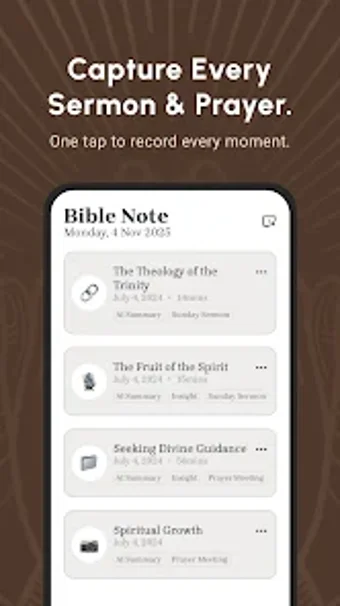
Capture sermons and convert them into study material with AI
Bible Note Taker Recorder by Note AI Pte. Ltd. is an Android study app designed to help Christians capture and organize sermon insights. It records live or uploaded audio and applies AI transcription to create searchable text and concise summaries, so users can stay present during services while preserving material for later study. The app also links verses to notes and supports multi-modal imports for later review. Suited to churchgoers, pastors, and small groups who need a study-focused digital companion for scripture retention.
How it supports long-term scripture memory
The app automates card creation and applies spaced repetition to schedule reviews, converting notes into active practice. Automated flashcard creation produces scripture memory cards and application prompts from user material. Suggested study habits include:
Daily short review sessions
Turning sermon highlights into question and answer pairs
This method suits self-directed learners focused on retention through retrieval practice rather than passive rereading.
Can group leaders prepare and share study material efficiently?
The app offers an AI chat that supplies context-aware prompts and integrated Bible references for tagging and lesson planning. Cloud backup and synchronization keep study files available across devices, which helps leaders assemble and distribute material for small groups. The developer emphasizes religious-language tuning, which reduces misidentification of theological terms and preserves pastoral phrasing in study outputs, a benefit for sermon-centered lesson preparation.
How learners measure progress and focus review
Progress tracking depends primarily on scheduled card reviews and generated highlights that condense long talks into reviewable points, supporting spaced study. Users give high marks to the quality of AI summaries, which aids targeted revision and helps learners prioritize passages for repetition. The design emphasizes self-paced review cycles and memorization benchmarks rather than formal grading, so it fits individuals and informal study groups more than institution-style assessment.
The app suits individual and small-group scripture study with one caveat
The app is a practical option for churchgoers and study leaders who want to deepen scripture retention through structured, habit-driven review. One consideration: its strengths align with individual and small-group study workflows rather than formal classroom grading or institution-wide reporting. For learners aiming to build steady memorization routines and reflective devotional practice, the app supports regular review and focused reflection.
Pros
Automated flashcard creation supports spaced repetition study
Context-aware AI chat provides theological prompts inside notes
Integrated Bible references and verse tagging for quick lookup
Cloud backup and synchronization keeps notes accessible across devices
Cons
Focused on Christian study, less suitable for secular subjects
Designed for individual and small-group use, not formal grading
Relies on AI-generated outputs that users should verify
Loading…
About permissions
Before downloading, you can take a quick look at the permissions this app may request on your device. App permissions allow certain features to work properly, such as accessing your camera to take photos, your location for maps, or your storage to save files.
In this section, you’ll find a clear and simple overview of the types of permissions the app uses, grouped by their level of sensitivity, along with a visual breakdown to help you understand them at a glance. This way, you can see how the app interacts with your device and decide to download with confidence.
Permissions types
Standard
44%
Non-standard
11%
Sensitive
44%
Permissions distribution
Privacy
39%
Data collected
33%
Data shared
28%
Data safety info
Privacy
7 permissions
Permissions that allow the app to access personal or sensitive information stored on your device, such as location, contacts, camera, or microphone.
This report summarises the permissions declared by the app at the time of scanning and groups them into Privacy, Data collected and Data shared. A declared permission shows what the app can access, it does not necessarily mean personal data is collected or transmitted. For full details check the app’s privacy policy and the developer’s clarifications shown below. Softonic generates this report automatically from the package metadata; it is informational and not a substitute for a full security or privacy audit.
Laws concerning the use of this software vary from country to country. We do not encourage or condone the use of this program if it is in violation of these laws. Softonic may receive a referral fee if you click or buy any of the products featured here.